


IT documentation is the job everyone agrees matters and almost nobody has time for. It sits at the bottom of the to-do list, just below “tidy the comms cupboard” and just above “work out why the printer VLAN is broken again.” Then one Friday afternoon the internet drops out, the one person who built the network is on a plane, and the whole office learns an awkward truth: nobody knows how the network works.
If that sounds familiar, you are in good company. Across Australian businesses, from a small accounting practice in Adelaide to a logistics firm in Brisbane, poor IT documentation quietly drains time, money and security every single week. It rarely shows up as a line item. It shows up as long outages, repeat support tickets, nervous audits and pricey consultants asked to “have a look around” and work out what is actually plugged in.
This guide covers the hidden cost of poor IT documentation, the warning signs to watch for, and a practical way to fix the problem without freezing your IT team for a month. We will also look at why the people who document networks best are usually the ones who understand them deeply, and how solid CCNA training in Australia builds exactly that understanding.
What Is IT Documentation, and Why Does It Keep Getting Skipped?
IT documentation is the written record of how your technology is built, configured and supported. Think network diagrams, IP address plans, device inventories, configuration backups, credentials held in a proper password manager, change logs, vendor contacts, and step-by-step runbooks for the things that go wrong. In plain terms, it is the map that lets someone other than the original builder find their way around.
So why does it get skipped? Mostly for very human reasons:
- Urgent beats important. Fixing today’s outage always wins over writing up yesterday’s.
- It feels like admin. Engineers are hired to build things, not to write about them.
- Knowledge feels safe in someone’s head. That holds true right up until they resign, get sick or take a well-earned holiday.
- Documents go stale. A diagram that was right in March is wrong by June, so people stop trusting it and then stop updating it.
Notice that none of those reasons are technical. That is good news, because it means the problem can be solved with habits rather than heroics.
The Day Everyone Realises Nobody Knows How the Network Works
Picture a mid-sized business with two offices and about sixty staff. The network was set up years ago by a contractor who has since moved on. Since then, three different people have made “a few tweaks.” There is a switch in a cupboard nobody can label, a firewall rule nobody dares remove, and a Wi-Fi password written on a sticky note under a keyboard.
Then a core switch fails. The replacement arrives the next morning, but nobody has a configuration backup, nobody remembers the VLAN layout, and the old diagram still shows a server that was retired two years ago. What should have been a one-hour swap turns into a two-day scramble, with staff sent home and customers left waiting.
This is a composite scenario, but almost every IT professional has lived some version of it. The hardware failure was not the real problem. The missing IT documentation was.
The Hidden Costs of Poor IT Documentation
Because the damage is spread thin, it is easy to miss. Here is where it really lands.
1. Slower troubleshooting and longer outages
Without an accurate map, every fault starts with detective work. Engineers trace cables, guess at configurations and test theories one by one. Every minute spent rediscovering the network is a minute your people cannot work. With proper network documentation, the same fault is often a quick lookup and a targeted fix.
2. Key-person risk
When one person holds the whole network in their head, your business has a single point of failure that no redundancy plan covers. If they leave, you do not just lose a colleague. You lose years of context about why things were built the way they were.
3. Security gaps and failed audits
You cannot protect what you cannot see. Undocumented devices, forgotten firewall rules and old user accounts are exactly where attackers look. Frameworks such as the Australian Cyber Security Centre’s Essential Eight assume you know what you have and how it is configured. Weak IT documentation makes that nearly impossible, and it makes audits painful.
4. Slow onboarding and wasted training time
New starters take far longer to become useful when every answer needs a person. Good documentation turns “ask Dave” into “check the runbook,” and it frees your senior engineers to do real work instead of answering the same questions.
5. Repeated mistakes and rework
If a fix is not written down, it gets rediscovered the next time the problem appears, usually at a worse moment. Teams without a record of past incidents tend to solve the same issue again and again.
6. Expensive projects and migrations
Cloud migrations, office moves, Wi-Fi upgrades and vendor changes all begin with the same question: “what do we have now?” If nobody can answer, the project starts with a costly discovery phase, and surprises tend to appear mid-project, when they cost the most.
Add these together and the cost of poor IT documentation is rarely small. It is just invisible until something breaks.
Warning Signs Your Network Documentation Is Failing
Not sure where you stand? Check how many of these sound like your workplace:
- Your network diagram is more than a year old, or it does not exist.
- Only one or two people know how critical systems are configured.
- Device configurations are not backed up in a central place.
- Staff regularly say, “I think it is set up like that because…”
- Passwords live in spreadsheets, emails or sticky notes.
- Changes happen without anyone recording what changed, why, or who did it.
- Onboarding a new engineer mostly means shadowing someone for weeks.
- You dread audits, renewals and upgrades.
If you ticked three or more, it is time to act.
What Good IT Documentation Actually Includes
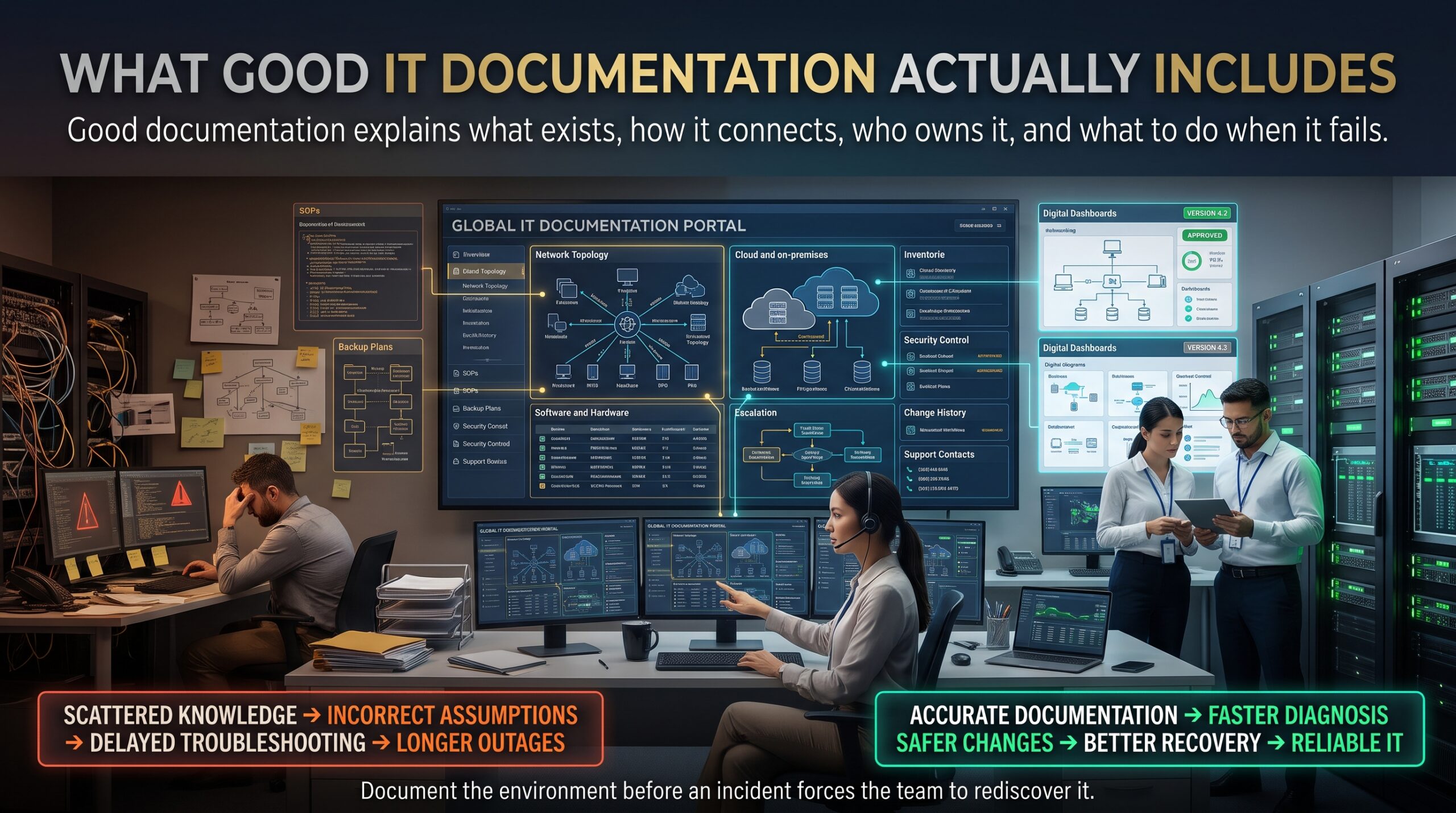
You do not need a hundred-page manual. You need a small set of documents that are accurate, easy to find and easy to update. Here is a practical starting list.
| Document | What it covers | Why it matters |
| Network diagrams | Devices, links, VLANs, subnets and internet connections (logical and physical) | Faster troubleshooting and clearer planning |
| IP address and VLAN plan | Subnets, ranges, static assignments and DHCP scopes | Prevents conflicts and speeds up changes |
| Asset inventory | Hardware, models, serial numbers, firmware versions and warranty dates | Supports budgeting, replacement and audits |
| Configuration backups | Routers, switches, firewalls and access points | Turns a failed device into a quick swap |
| Change log | What changed, when, why and by whom | Lets you roll back and learn from mistakes |
| Runbooks and SOPs | Step-by-step instructions for common tasks and failures | Reduces dependence on individuals |
| Access records | Who can access what, with credentials stored in a password manager | Strengthens security and offboarding |
| Vendor and contract details | Contacts, support levels and renewal dates | Avoids lapsed support at the worst moment |
Figure 1: An undocumented network versus a documented network. The same equipment, but only one is easy to support.
How to Fix IT Documentation Without Stopping Everything
The secret is to start small and make documenting part of the work, not a separate project. Here is a sensible order of attack:
- Start with what hurts most. Pick the one or two systems that would cause the biggest outage if they failed, such as the core switch, firewall and internet connection, and document those first.
- Draw the network as it really is. Walk the cables if you have to. A rough but accurate diagram beats a beautiful, wrong one.
- Back up configurations automatically. Set a schedule so device configs are saved without anyone needing to remember.
- Choose one home for everything. Whether it is a wiki, a documentation platform or a tidy shared drive, one trusted location beats five scattered ones.
- Make documentation part of “done.” A change is not finished until the record is updated. Add it to your change checklist.
- Assign owners and review dates. Give every document a named owner and a quarterly check so nothing quietly goes stale.
- Test it. Hand a runbook to someone who did not write it and see if they can follow it. Their confusion shows you what is missing.
Small, steady habits win. Fifteen minutes after each change will do more for your IT documentation than a heroic sprint once a year.
Why Network Skills Make IT Documentation Better
Good IT documentation needs two things: discipline and understanding. You cannot draw a clear diagram of something you do not really understand. If you are shaky on how VLANs, subnetting, routing and switching fit together, your documents end up vague, incomplete or simply wrong.
This is where structured learning pays off. The Cisco CCNA covers the foundations that sensible network documentation relies on: network fundamentals and the OSI model, IPv4 and IPv6 addressing, subnetting, VLANs, OSPF routing, switching, and security and automation basics. Engineers who have worked through these topics tend to document more clearly because they know what matters, what to record and how to name things. You can see the full syllabus on the CCNA modules page, or read what CCNA is if Cisco certification is new to you.
It is also a smart career move. Well-run, well-documented networks need people who can build and explain them, which is why roles such as network support technician, network administrator and junior network engineer remain in demand. If you are weighing up the investment, the guides on CCNA certification cost in Australia and CCNA exam preparation are good places to start, and these CCNA exam tips help once you are studying.
For hands-on learners, the instructor-led CCNA training course uses labs with Cisco simulators, and the CCNA bootcamp suits people who want a faster pace. The vendor’s own Cisco Learning Network is another handy free resource for study and community support, and you can explore the wider Cisco certification pathway on Cisco’s website.
Learn Network and IT Documentation Skills Across Australia
Whether you are upskilling a whole team or building your own career, there is a CCNA option near you:
- Melbourne: join a CCNA course in Melbourne at the West Melbourne campus.
- Sydney: book a CCNA course in Sydney based in Surry Hills.
- Brisbane: study CCNA training in Brisbane in the heart of the city.
- Adelaide: choose CCNA training in Adelaide through live online or in-house delivery.
- Perth: take CCNA training in Perth online or arrange an in-house team session.
- Canberra: explore a CCNA course in Canberra, delivered live online or in-house.
Not near a capital city? Live online options mean you can learn from anywhere in Australia. You can also browse more guides on the CCNA blog.
Frequently Asked Questions About IT Documentation
What is IT documentation?
IT documentation is the organised written record of your technology: network diagrams, device lists, configurations, procedures, access details and change history. Its job is to let any qualified person understand, support and rebuild your systems without relying on one individual’s memory.
Why is IT documentation important?
It cuts downtime, lowers security risk, speeds up onboarding and makes audits, upgrades and migrations far cheaper. It also protects your business when key staff leave.
What should network documentation include?
At a minimum: logical and physical network diagrams, an IP and VLAN plan, an asset inventory, configuration backups, a change log, runbooks for common tasks and faults, access records, and vendor contacts.
How often should IT documentation be updated?
Update it whenever something changes, and review everything at least once a quarter. The most reliable approach is to make updating the record a required step in every change.
Who is responsible for IT documentation?
Everyone who changes the environment shares responsibility, but each document should still have one named owner who keeps it current.
Does CCNA training help with network documentation?
Yes. CCNA covers addressing, subnetting, VLANs, routing, switching and security, which are the building blocks of any useful network diagram or runbook. Knowing the concepts makes your records clearer and more accurate.
What is the best tool for IT documentation?
The best tool is the one your team will actually use. A simple wiki or shared knowledge base, kept tidy and reviewed regularly, will beat an expensive platform that nobody updates.
Stop Letting the Network Live in One Person’s Head
Nobody plans to have poor IT documentation. It happens slowly, one skipped note at a time, until a bad day exposes the gap. The good news is that you can fix it steadily: document the critical systems first, build the habit of updating records after every change, and invest in the skills that make the records worth reading.
Ready to build those skills? Explore the CCNA training course, check the course modules, or contact the team to talk about the right option for you or your IT team. Your future self, and whoever inherits your network, will thank you.