



A network black hole is the kind of fault that makes experienced engineers doubt themselves. The ping replies come back clean, the link lights are green, and the monitoring tool says everything is up. Meanwhile the accounts team cannot open the ERP, the VPN drops halfway through login, and a video call freezes right after the first hello.
If you have ever typed ping, watched four happy replies roll in, and still had an application refuse to work, you have already met the network black hole problem. This guide explains what is really happening, why ping is a much weaker test than most people think, how to track down the real fault in about fifteen minutes, and which skills you need to do it calmly when a manager is standing behind you. It is written for helpdesk staff moving into networking, junior network engineers, and anyone preparing for the Cisco CCNA 200-301 exam in Australia.
What Is a Network Black Hole?
In networking, a black hole is a point on the path where packets go in and nothing comes out. There is no error message and no “destination unreachable”. The packet simply vanishes. That silence is what makes a network black hole so frustrating, because the usual clues never show up.
Black holes come in a few flavours. A routing black hole happens when a router forwards traffic to a next hop that discards it, for example a null route or a summary route that points nowhere. A filtering black hole happens when a firewall or access control list drops traffic without telling the sender. An MTU black hole, probably the most common one in modern networks, happens when large packets are dropped because they cannot fit through a link and the warning that should tell the sender about it never arrives.
What every network black hole shares is selective failure. Some traffic gets through, some does not, and ping usually sits on the lucky side of the line.
Why Ping Works but Applications Still Fail
Ping sends an ICMP echo request, a tiny packet of 64 bytes on most Cisco and Linux systems and 32 bytes of data on Windows. It proves exactly one thing: a small ICMP packet can reach the target and a small reply can come back. Real applications behave very differently.
| Factor | What ping tests | What a real application needs |
| Protocol | ICMP echo only | TCP or UDP on a specific port such as 443, 3389 or 1433 |
| Packet size | Tiny, a few dozen bytes | Packets up to the full MTU, often 1500 bytes |
| Policy | Frequently permitted for monitoring | Port-based ACLs, firewall rules and NAT all apply |
| State | Stateless in practice | Stateful sessions that need traffic to flow both ways through the same device |
| Dependencies | None | DNS, TLS certificates, authentication servers, licensing |
So when someone says “the network is fine, I can ping it”, the honest answer is that ping is fine. The network is not proven, and a network black hole hides in exactly that gap. A successful ping tells you that layer 3 reachability exists for one tiny packet and nothing more.
Cause 1: The MTU and Path MTU Discovery Black Hole
Standard Ethernet carries 1500 bytes per packet. Tunnels and overlays eat into that. IPsec, GRE, VXLAN, PPPoE (which drops you to 1492) and some cloud connections all add headers, so the usable size shrinks to something like 1400 or less.
When a large packet with the Don’t Fragment bit set meets a link that is too small, the router is supposed to drop it and send back an ICMP message, type 3 code 4, saying “fragmentation needed”. The sender then shrinks its packets. That process is called Path MTU Discovery and it is defined in RFC 1191.
Now picture a firewall in the middle that blocks all ICMP “for security”. The warning never arrives, the sender keeps resending big packets, and every one of them is silently discarded. Small packets still pass, including the TCP handshake and your ping. This is the classic MTU network black hole, and the symptoms are easy to recognise once you have seen them:
- A website loads its text but the images hang
- SSH connects, then freezes the moment a command prints a long output
- A VPN shows as connected but file shares never open
- Small emails go through while messages with attachments sit in the outbox
IPv6 makes this worse. Routers do not fragment IPv6 packets at all, so the protocol depends entirely on Path MTU Discovery, described in RFC 8201. Block the ICMPv6 “Packet Too Big” message and you have built a network black hole by hand.
Cause 2: ACLs That Allow ICMP but Block the Real Port
Plenty of security teams permit ICMP so monitoring tools stay happy, then lock down everything else. On a Cisco router or firewall, every access list ends with an implicit deny. If somebody adds a permit for ping but forgets TCP 443 for a new server, the host answers ping all day while the application never connects. That is a filtering network black hole in its simplest form. The giveaway is in the hit counters: run show access-lists and watch which line is incrementing while you test.
Cause 3: Asymmetric Routing and Stateful Firewalls
Asymmetric routing means the request leaves through one path and the reply comes back through another. Stateless ICMP often survives this. A stateful firewall does not. If it never saw the original SYN, it treats the returning SYN-ACK as unsolicited and drops it, so the TCP handshake never completes. This tends to appear after a second internet link is added or an OSPF cost is changed, and it feels random until you check the return path. In effect it is a network black hole that only swallows one direction.
Cause 4: NAT, Missing Return Routes and Name Resolution
A server that has no route back to the client subnet can receive the request but cannot answer it. A NAT rule that translates one direction and not the other produces the same result. And do not forget DNS: pinging an IP address works while the application, which uses a hostname, fails because the name resolves to the wrong address. Test by IP and by name before you blame the network.
How to Troubleshoot a Network Black Hole Step by Step

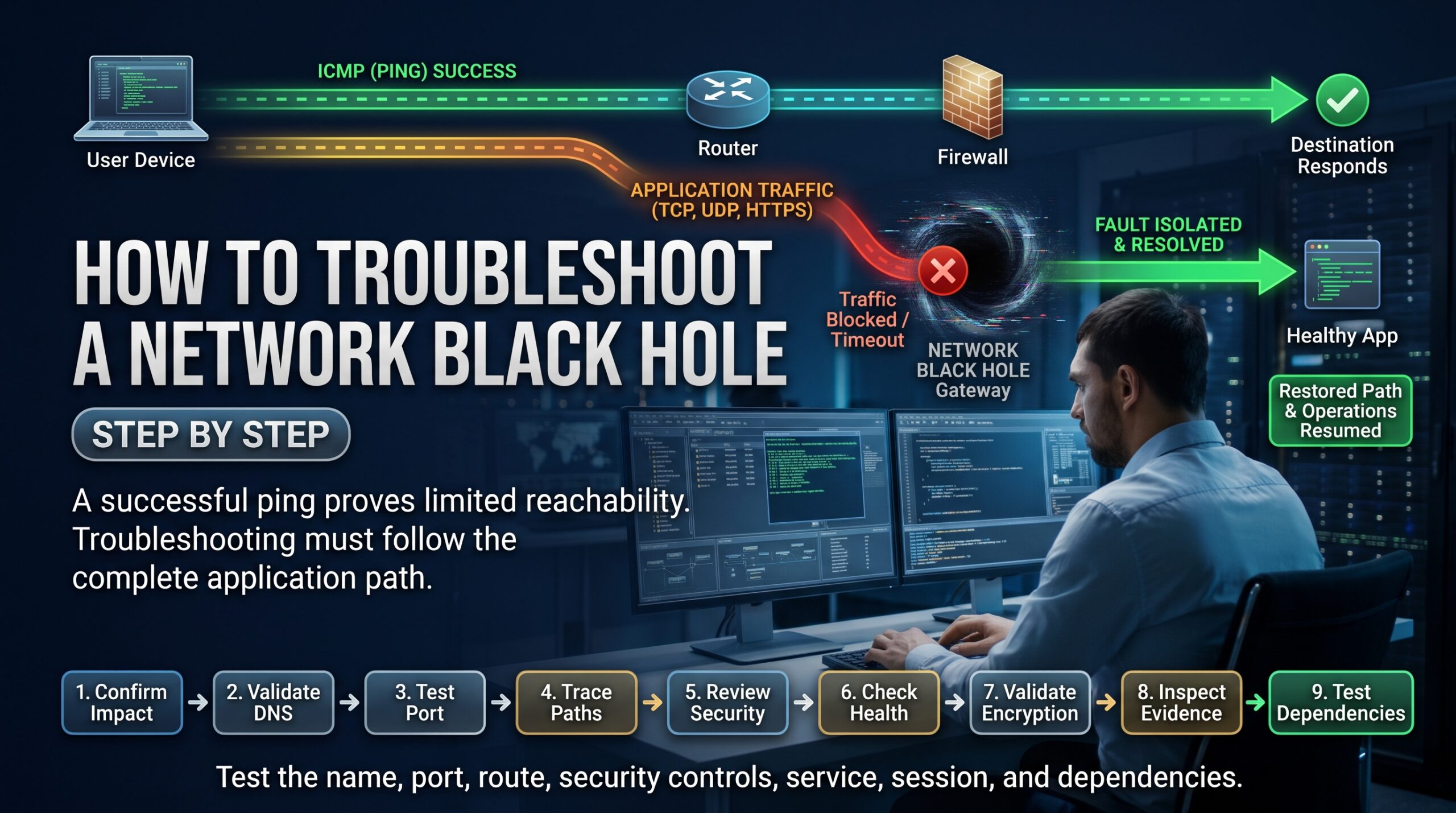
Whenever you suspect a network black hole, stop asking “is it up?” and start asking “which exact packets are being lost?”. This sequence works on most networks:
- Define the failing flow. Write down the source IP, destination IP, protocol and port. Vague reports like “the system is slow” waste an hour.
- Test the port, not just the host. On Windows PowerShell use Test-NetConnection server -Port 443. On Linux use nc -vz server 443. If the port test fails while ping works, you are looking at a filter or a service problem.
- Test with large packets. Send full-size packets with the Don’t Fragment bit set and reduce until they pass. The commands are in the box below.
- Trace the path in both directions. Run tracert or traceroute from each end and note where replies stop. Asymmetric paths show up here.
- Read the counters. Check show access-lists, interface error counters and firewall logs while you reproduce the fault.
- Verify routing both ways. Use show ip route for the destination and again for the return network on every device in the path.
- Capture packets. Run Wireshark at both ends. A SYN with no SYN-ACK points to filtering or routing. Large segments retransmitted again and again point to an MTU problem.
The size test is the fastest way to confirm an MTU black hole. A value of 1472 plus 28 bytes of IP and ICMP headers equals 1500:
Windows: ping server -f -l 1472
Linux: ping -M do -s 1472 server
Cisco IOS: ping server size 1500 df-bit
If 1472 fails and 1372 passes, something on the path is smaller than 1500.
How to Fix a Network Black Hole: Common Faults and Remedies
| Symptom | Likely cause | Typical fix |
| Small pings pass, large pings fail | MTU or PMTUD black hole | Permit ICMP type 3 code 4, set the correct interface MTU, clamp TCP MSS |
| Ping works, one port fails | ACL or firewall rule missing | Add a permit for the exact port and confirm the hit counter moves |
| TCP handshake never completes | Asymmetric routing with a stateful firewall | Fix the return path or make routing consistent |
| Works by IP, fails by name | DNS misconfiguration | Check the resolver, records and search domains |
| VPN connects, then stalls | Tunnel overhead reduces MTU | Lower the MSS on the tunnel or LAN interface |
For tunnel problems, MSS clamping is the practical fix on a Cisco router. It rewrites the maximum segment size inside TCP handshakes so hosts never send packets that are too big in the first place. Adjust the numbers to match your own tunnel overhead:
interface GigabitEthernet0/1
ip mtu 1400
ip tcp adjust-mss 1360
The longer-term fix for any network black hole is cultural. Treat ICMP as essential plumbing instead of an optional extra. Allow echo according to your policy, but always let through type 3 messages, and for IPv6 the Packet Too Big message. Cloudflare’s explanation of MTU and MSS is a good short read to share with your security team.
Why CCNA Skills Help You Solve a Network Black Hole Fast
Every cause above maps to something in the Cisco CCNA 200-301 blueprint: IP connectivity and OSPF routing, IP services such as NAT, security fundamentals including ACLs, and network access. Employers do not hire CCNA holders to recite the OSI model. They hire people who can look at a failing application, form a hypothesis, prove it with a command, and fix it without taking the network down.
That is why hands-on lab time matters. In a good course you build a topology, break it on purpose, and learn what a network black hole looks like on the screen. You can see exactly how the CCNA modules are structured, read the CCNA training course outline, or choose the faster CCNA bootcamp if you want to get certified quickly. If you are still weighing it up, check the CCNA certification cost in Australia, read our CCNA exam preparation guide and the walkthrough on how to pass CCNA 200-301. The official Cisco CCNA certification page lists the current exam topics.
Our CCNA program is job-focused, includes the exam voucher, and is listed at AUD $1,995 with full-time and part-time options. Seats are limited each intake.
Network Black Hole Troubleshooting Skills Across Australian Cities
Wherever you work, the same network black hole keeps appearing, only the environment changes. Classes run in person in Melbourne, Sydney and Brisbane, and live online or in-house for Adelaide, Canberra and Perth.
| City | Typical environment where black holes appear | Course page |
| Sydney | Financial services, managed service providers and large multi-site enterprises | CCNA course Sydney |
| Melbourne | MSPs, telcos, education and healthcare networks | CCNA course Melbourne |
| Brisbane | Government, resources and infrastructure projects | CCNA course Brisbane |
| Perth | Mining and energy sites linked back by VPN and WAN circuits | CCNA course Perth |
| Adelaide | Defence, health and manufacturing networks | CCNA training Adelaide |
| Canberra | Federal government agencies and their contractors | CCNA course Canberra |
Frequently Asked Questions About the Network Black Hole Problem
Why can I ping a server but not connect to its application?
Ping only proves a tiny ICMP packet can travel both ways. The application uses a specific TCP or UDP port, bigger packets and a stateful session, so a network black hole caused by an ACL, firewall rule, MTU limit or return-path problem can break it while ping keeps working.
What is a network black hole in simple terms?
It is a spot in the network where traffic is dropped silently, with no error sent back. Because nothing reports the loss, the sender just keeps waiting and retrying.
How do I test for a network black hole caused by MTU?
Send ping packets with the Don’t Fragment bit set at 1472 bytes of data, then step down until they succeed. If large packets fail and small ones pass, you almost certainly have an MTU network black hole or a Path MTU Discovery problem.
Is it safe to block ICMP on a firewall?
Blocking all ICMP is a common mistake. You can restrict echo if policy requires it, but you must allow type 3 messages, especially code 4, and ICMPv6 Packet Too Big, or large transfers will quietly fail.
Is CCNA enough to troubleshoot these problems?
CCNA gives you the foundation: routing, ACLs, NAT and troubleshooting method. Speed comes from lab practice, which is why hands-on training makes such a difference when you start in a real NOC or helpdesk role.
Stop Guessing and Start Fixing
The next time ping works and the application does not, you will know the network black hole is hiding in the details: packet size, port policy, return paths or a blocked warning message. Learn the commands, practise on a lab, and the fifteen-minute fix becomes routine. When you are ready to build those skills with an instructor, book your CCNA place now or talk to our team on 1300 649 299. You can also explore the wider Logitrain IT training range.