



Network time drift is one of those problems that stays invisible until something important breaks. A user can’t log in even though the password is right. A security alert fires, but the timestamps on the firewall, the server and the switch don’t line up, so nobody can say what happened first. Behind both scenes sits the same quiet culprit: clocks that disagree by a few minutes, or a few seconds.
This guide explains what network time drift is, how it damages authentication, logging and incident investigation, and how to fix it using Network Time Protocol (NTP). If you’d like structured, hands-on practice, we’ve linked to CCNA training in Australia near the end.
What Is Network Time Drift (and Why Does It Happen)?
Every device keeps time with a small internal oscillator. These aren’t perfect. Temperature, age and load all nudge them, so each device slowly runs a little fast or a little slow. Left alone, the error grows. That gradual divergence between devices is network time drift.
Network Time Protocol exists to keep clocks aligned. It works through a hierarchy of time sources called strata, starting from highly accurate references such as GPS or atomic clocks and passing time down to servers, routers and endpoints. The protocol itself is described in RFC 5905, and it uses UDP port 123.
So why does network time drift still happen on managed networks? The usual reasons are:
- NTP was never configured on some devices, so they rely on their own clock.
- A firewall or ACL blocks UDP 123, so devices can’t reach their time source.
- Everything points at a single NTP server that failed or was moved.
- Time zones and daylight saving settings are inconsistent between devices.
- Virtual machines were paused, snapshotted or migrated and woke up with an old time.
- Lab or test gear was never synchronised and later joined production.
How Network Time Drift Breaks Authentication
Many security protocols rely on timestamps, not just secrets. When two systems disagree about the time, perfectly valid credentials get rejected.
Kerberos and Active Directory
Kerberos is strict about time. By default, Active Directory environments tolerate a clock difference of only about five minutes between client and domain controller. Beyond that, tickets are rejected and users see confusing login failures. Kerberos) uses timestamps to prevent replay attacks, which is exactly why drift matters.
Multi-factor authentication codes
Authenticator apps generate time-based one-time passwords that change every 30 seconds. If the server’s clock drifts, the code the user types was valid on the phone but isn’t what the server expects. Some systems allow a small tolerance, but not much.
TLS certificates
Certificates have a “not before” and “not after” date. A device with the wrong time may decide a perfectly good certificate is expired, or not yet valid, and refuse the connection. This is a classic cause of VPN, web and API failures.
Tokens and cloud APIs
SAML assertions and JWT tokens carry validity windows, and many cloud APIs reject requests whose timestamp is too far from the server’s time, often within about five minutes. A drifting integration server can suddenly start failing with no code changes at all.
How Network Time Drift Corrupts Your Logs
Logs are only useful if you can put them in order. When devices disagree about the time, you end up with an event that appears to happen before its own cause. Correlating a firewall block, a server login and a switch port change becomes guesswork.
Security tools suffer too. A SIEM can only correlate events accurately if timestamps are trustworthy. Drift causes missed correlations, false alerts and gaps where events seem to disappear because they landed in the wrong time window.
Mixed time zones make things worse. One device logs in UTC, another in local time, a third in local time without any zone label. Even with perfect synchronisation, ambiguity in the timestamp format can mislead an investigation.
Network Time Drift and Incident Investigation
During an incident, the first job is to build a timeline: when did the attacker get in, what did they touch, and when did they leave? That timeline is built from log entries across many devices. With network time drift, each source is offset by a different amount, and you spend hours working out the offsets instead of investigating.
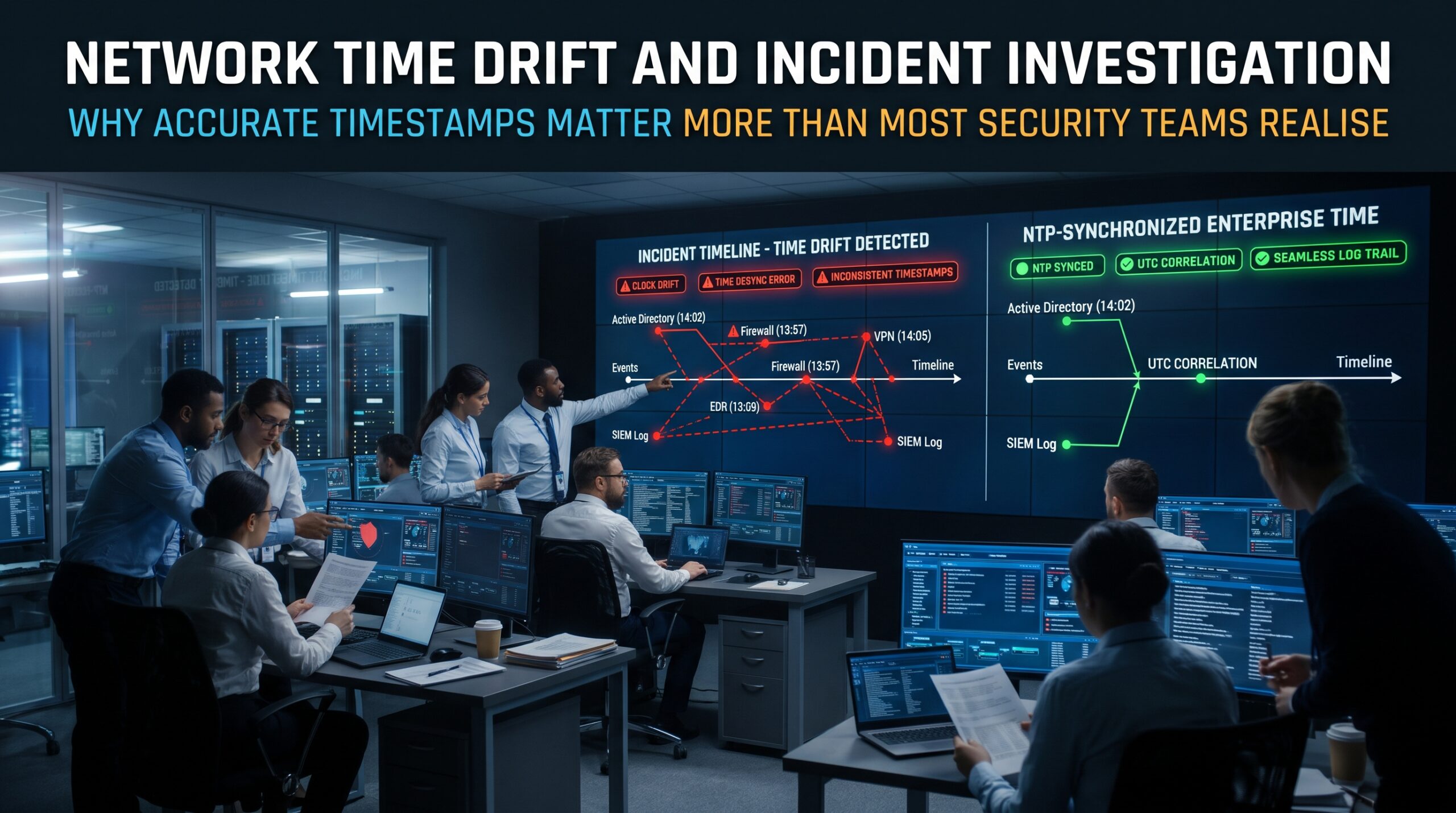
The consequences go beyond inconvenience. Poorly aligned timestamps weaken the reliability of evidence, which matters for forensic work, regulatory reporting and any legal process. The NIST guide to computer security log management highlights the importance of consistent time across log sources for exactly this reason.
A Network Time Drift Example: The Seven-Minute Mystery
Here is an illustrative scenario. A branch office reports users locked out of file shares. The help desk resets passwords and nothing changes. Eventually someone notices that the branch server is seven minutes behind the domain controller after a power outage reset its clock. Kerberos tickets are being rejected. Fixing the time takes two minutes, but finding the cause took half a day because nobody checked the clock first.
The security team has the same experience later: the VPN gateway’s logs are seven minutes out of step with the domain controller, so the login that triggered an alert appears to happen after the file access it caused. Same root cause, different symptom.
Warning Signs of Network Time Drift
- Logins fail intermittently with no password or account problem.
- Certificate errors appear on devices that were working yesterday.
- Log entries from different devices contradict each other.
- Authenticator codes are rejected for some systems but not others.
- Devices report “clock is not synchronized” or show a high stratum number.
- Time zone offsets differ between devices in the same site.
How to Fix Network Time Drift: 7 Practical Steps
- Choose reliable time sources. Use at least two or three internal NTP servers that sync from trusted upstream sources, such as GPS or reputable public servers (for example, au.pool.ntp.org). Avoid depending on one.
- Point everything at them. Routers, switches, firewalls, servers and appliances should all use your internal servers rather than the internet directly.
- Allow NTP through the network. Check that UDP port 123 is permitted from clients to your NTP servers, and nowhere else it doesn’t need to be.
- Use UTC for logs. Keep devices logging in UTC where possible, or include clear time zone labels so timestamps are never ambiguous.
- Secure NTP. Enable NTP authentication where supported and restrict who can query or serve time, so an attacker can’t push a false clock.
- Monitor synchronisation. Alert when a device loses sync or drifts beyond a threshold. Don’t wait for a user complaint.
- Document and test. Record your time design and test it after outages, firmware upgrades and network changes.
Network Time Drift Fix on Cisco Devices: A Basic NTP Example
On Cisco IOS devices, a basic setup looks like this. Treat it as a starting point and adapt the addresses and key to your environment:
! Time zone and daylight saving (Sydney / Melbourne)
clock timezone AEST 10
clock summer-time AEDT recurring 1 Sun Oct 2:00 1 Sun Apr 3:00
!
! NTP with authentication
ntp authenticate
ntp authentication-key 1 md5 YourSecretKey
ntp trusted-key 1
ntp server 192.0.2.10 key 1
ntp server 192.0.2.11 key 1
!
! Make logs show precise, labelled time
service timestamps log datetime msec localtime show-timezone year
Then check the result with these commands:
show ntp status
show ntp associations
show clock detail
Look for “Clock is synchronized” and a sensible stratum value. If you see “unsynchronized,” check reachability to the server, access lists, authentication keys and the source interface.
Network Time Drift Checklist
| Area | What good looks like | Quick check |
| Time sources | Two or more reliable internal NTP servers | show ntp associations |
| Coverage | Every device syncs to those servers | Compare clocks across devices |
| Firewalling | UDP 123 allowed only where needed | Review ACLs and firewall rules |
| Log format | UTC or clearly labelled time zone, millisecond precision | Review service timestamps settings |
| Authentication | NTP keys in use, queries restricted | Check ntp authenticate status |
| Monitoring | Alerts on lost sync or large offset | Test by stopping an NTP server |
Learn NTP, Syslog and Network Troubleshooting: CCNA Training in Australia
Understanding network time drift sits squarely within core networking skills. The CCNA 200-301 exam blueprint includes IP services such as NTP and syslog, alongside routing, switching, security fundamentals and troubleshooting (check Cisco’s current blueprint for the latest detail). Our hands-on CCNA program lets you practise these configurations on real devices and simulators.
- CCNA Certification Overview explains the certification and what it covers.
- CCNA Modules shows the full curriculum.
- CCNA Training Course is the instructor-led program itself.
- CCNA Bootcamp suits learners who want an intensive format.
- What is CCNA and CCNA certification cost in Australia answer the most common starting questions.
- CCNA Exam Preparation, CCNA Exam Tips, CCNA Exam Questions and How to pass CCNA 200-301 help you get exam-ready.
Training is offered in the following cities, with live online and in-house options also available:
- CCNA course in Melbourne
- CCNA course in Sydney
- CCNA training in Brisbane
- CCNA training in Perth
- CCNA training in Adelaide
- CCNA course in Canberra
Have questions about prerequisites, timing or delivery? Visit our CCNA FAQ page.
Network Time Drift FAQs
What is network time drift?
It’s the gradual difference that develops between the clocks of devices on a network because internal clocks run slightly fast or slow. Without synchronisation, the gap keeps growing.
How much time difference breaks Kerberos?
By default, Active Directory allows about five minutes of clock skew. Larger differences cause ticket requests to fail.
Why do my logs show events out of order?
Usually because devices are using different clocks or time zones. Synchronise everything with NTP and log in UTC or with clear time zone labels.
What port does NTP use?
NTP uses UDP port 123. If it’s blocked between a device and its time server, the device can’t synchronise.
How do I check NTP on a Cisco router?
Use show ntp status and show ntp associations. A healthy device shows a synchronised clock and a reachable server with a reasonable stratum.
Is NTP covered in the CCNA exam?
The CCNA 200-301 blueprint covers IP services including NTP and syslog. Confirm the latest objectives on Cisco’s website, and see our CCNA exam preparation guide for more.
Final Thoughts: Fix the Clock Before You Need It
Network time drift is cheap to prevent and expensive to ignore. Point every device at reliable internal NTP servers, allow the traffic, log in UTC, secure the service and monitor it. Then the next time authentication fails or an incident hits, your first question won’t be “whose clock is right?”
Ready to build these networking skills? Explore our CCNA training, read more on the CCNA Certification blog, or contact our team to find the right course for you.