

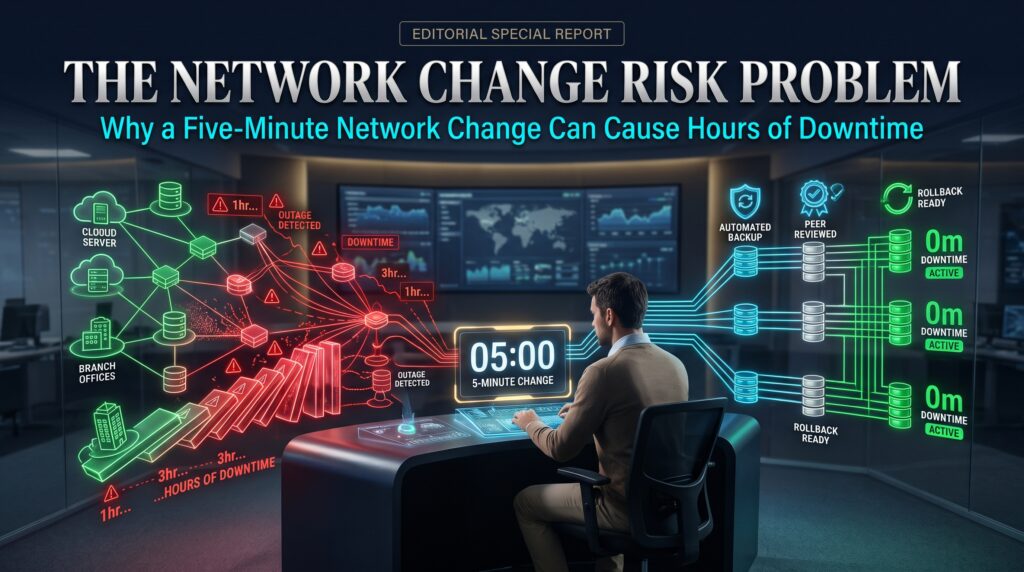


Network change management is the discipline of planning, approving, testing, applying and verifying changes to network infrastructure so that a quick fix does not turn into a long outage. It sounds like paperwork until the day a single command, typed in under five minutes, takes down a branch office, a data centre link or an entire trading floor. Then it becomes the most valuable process in IT.
Almost every network engineer has a story like this. A routine tweak, a late-afternoon access list update, a VLAN added to a trunk, and suddenly half the company cannot reach the application. The change itself was tiny. The recovery took hours. That mismatch between effort and impact is what this article calls the network change risk problem.
Below you will find why small changes cause outsized outages, what the usual culprits are, how good network change management reduces the risk, and which skills and Cisco certifications help you handle it professionally. Whether you run a network, support one or are studying for your CCNA, the lessons are practical and immediately usable.
What Is the Network Change Risk Problem?
The network change risk problem is the gap between how simple a change looks and how much it can affect. A network is not a set of isolated devices. It is a web of dependencies: routing protocols, spanning tree, redundancy pairs, access lists, NAT rules, DNS, QoS policies and the applications riding on top. Touching one part changes how the others behave, often in ways nobody wrote down.
That is why the effort to make a change and the effort to recover from a bad one are so lopsided. Typing the command takes seconds. Finding out which of fifty dependencies it broke, proving the cause and rolling back safely can take an afternoon. Effective network change management exists to close that gap before the change is made, not after.
Why a Five-Minute Network Change Can Cause Hours of Downtime
When engineers look back at a bad outage, the cause is rarely exotic. It is usually one of a small set of patterns:
| Pattern | What it looks like in practice | Why recovery takes so long |
| Overwritten configuration | A trunk command replaces the allowed VLAN list instead of adding to it | Traffic drops on every VLAN not in the new list, and the cause is not obvious |
| Hidden dependency | A “unused” firewall rule or route turns out to carry critical traffic | Nobody owned the documentation, so impact is discovered live |
| Wrong scope | A change meant for one switch or interface is applied to many | Rolling back means touching every device again |
| Protocol reconvergence | A spanning tree, OSPF or BGP change triggers a topology recalculation | Convergence and flapping can last far longer than the change itself |
| No tested rollback | The old configuration was never saved or rehearsed | Engineers rebuild from memory under pressure |
| Lost management access | The change cuts the path used to manage the device | Recovery needs console access or a site visit |
| Bad timing | Change made during business hours or alongside another change | Multiple variables make troubleshooting slow |
Notice how many of these are process failures, not technical ones. The engineer knew the command. What was missing was a pre-change check, a clear scope, a verified backup or a rollback plan. That is the heart of network change management: making the safe path the default path.
A Realistic Example of Poor Network Change Management
Consider an illustrative scenario. An engineer is asked to allow a new VLAN across an inter-switch trunk. They enter the trunk command with only the new VLAN number, instead of using the “add” keyword. On many Cisco platforms, that replaces the existing allowed list. Within seconds, every other VLAN on that link stops passing traffic.
The monitoring dashboard turns red. Phones drop, wireless clients lose their gateway and a payment application times out. The engineer spots the typo within minutes, but fixing it is not the end. Spanning tree has recalculated, MAC address tables have aged out and some applications have dropped sessions that do not recover until users reconnect. A five-minute change has produced hours of disruption and an incident report.
Nothing about this scenario required a complicated environment. It needed a single missing word, no peer review and no verification step. Solid network change management would have caught it at three separate points.
The Core Elements of Network Change Management
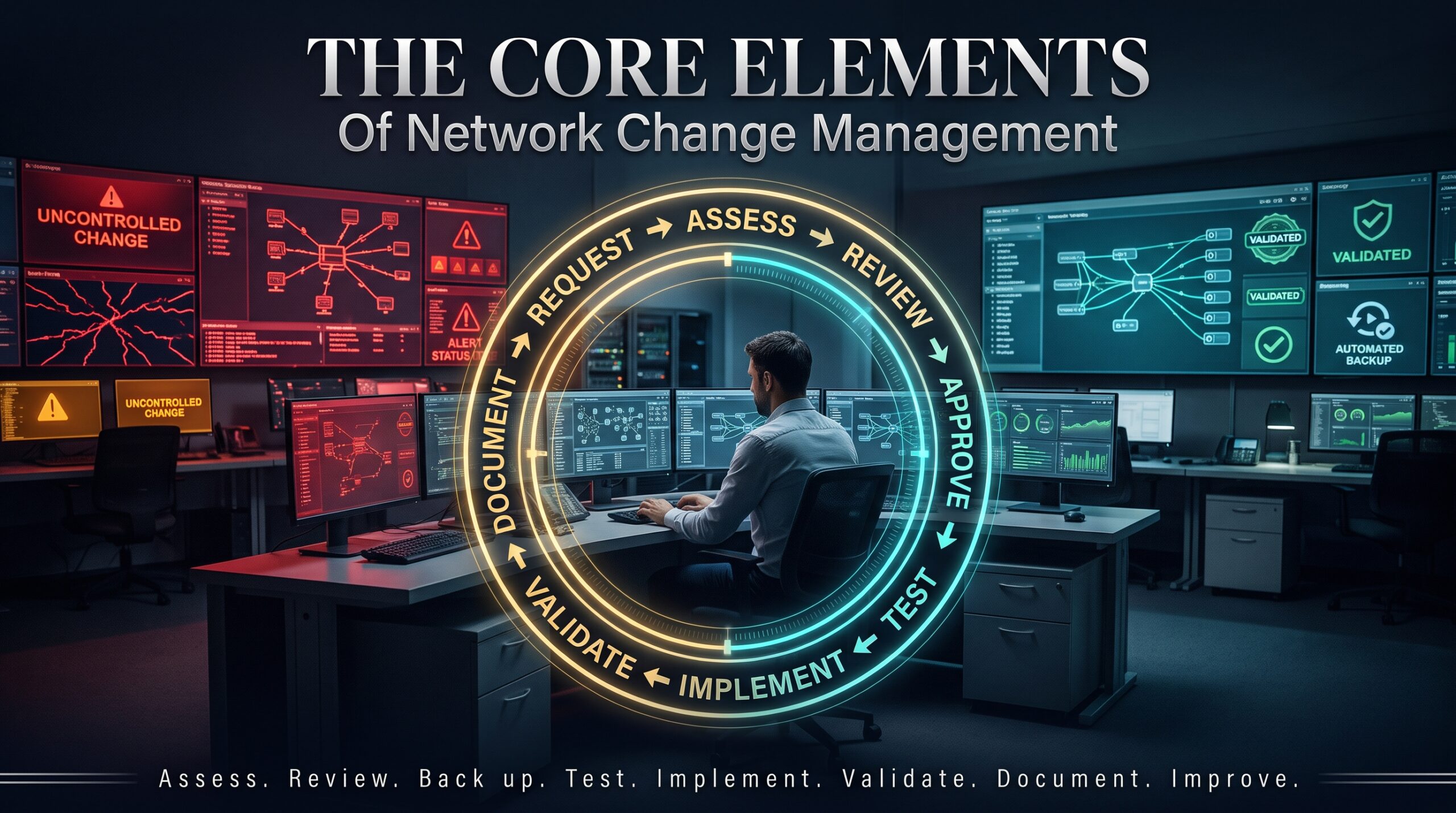
Frameworks like ITIL describe change enablement in service-management terms, and NIST SP 800-128 covers configuration change control for security. For network teams, practical network change management boils down to a handful of habits.
1. Classify the change by risk
Not every change needs the same ceremony. Routine, pre-approved changes such as adding a port description can follow a light process. High-impact changes such as core routing or firewall policy edits need review, a scheduled window and a rollback plan. Classifying by risk keeps the process proportionate, which is what stops teams from bypassing it.
2. Document the scope and expected impact
Write down exactly which devices, interfaces and services are involved and what should happen. If you cannot describe the expected result in a sentence, you are not ready to make the change.
3. Back up before you touch anything
Save the running configuration and store it off the device. Better still, keep configurations in version control so every change is a tracked, comparable difference.
4. Peer review the exact commands
A second pair of eyes catches the missing keyword, the wrong interface and the unintended wildcard mask. Review the actual commands or the automation diff, not a vague description.
5. Test in a lab first
Rehearse risky changes in a safe environment. Tools like Cisco Packet Tracer, GNS3 or Cisco Modeling Labs let you confirm the behaviour before it touches production. This is also one of the best ways to build real skill while studying.
6. Prepare a rollback and a safety net
Define the exact steps to undo the change and how long you will wait before triggering them. On Cisco devices, engineers often schedule a timed reload before a risky change and cancel it once success is confirmed, so a lockout fixes itself. Where supported, configuration archive and rollback features serve the same purpose.
7. Verify and monitor after the change
Do not stop when the command is accepted. Check routing tables, interface status, key application paths and monitoring dashboards. Confirm with the service owners that the business function works, not just that ping succeeds.
8. Review what happened
After significant changes or incidents, run a short blameless review. Update the documentation and add the missing checks to the standard process. Good network change management improves with every outage it learns from.
How Automation Improves Network Change Management
Manual changes depend on memory and concentration. Automation depends on tested logic. Tools such as Ansible network automation, Python libraries like Netmiko and NAPALM, and controllers such as Cisco Catalyst Center let teams push consistent configurations, run pre-change and post-change checks and compare intended state with actual state.
Automation does not remove the need for judgement. A bad template can break a hundred devices faster than a person can break one. The safest approach to automated network change management is to combine automation with the same disciplines as before: review, lab testing, staged rollout and verification. If you are early in your career, a little Python alongside your CCNA is one of the quickest ways to stand out.
Network Change Management Tools at a Glance
| Need | Example tools | What they help with |
| Configuration backup and version control | Git, RANCID, Oxidized, Cisco Catalyst Center | Tracks every change and allows quick comparison and restore |
| Change approval and records | ITSM platforms such as ServiceNow and Jira Service Management | Documents approvals, risk and timing |
| Lab testing | Cisco Packet Tracer, GNS3, Cisco Modeling Labs | Rehearses changes without production risk |
| Monitoring and alerting | SolarWinds, PRTG, Zabbix, syslog, SNMP, NetFlow | Detects impact immediately after a change |
| Troubleshooting | Wireshark, traceroute, show commands, packet captures | Pinpoints what the change affected |
| Automation | Ansible, Python with Netmiko and NAPALM | Applies and validates changes consistently |
Skills and Certifications for Network Change Management
Engineers who understand why networks fail are the ones trusted to change them. Cisco certifications build the understanding behind network change management in layers:
| Certification | Relevance to safe changes | Who it suits |
| Cisco CCST Networking | Core network concepts and basic troubleshooting | Beginners and help desk moving into networking |
| Cisco CCNA 200-301 | Routing, switching, IP services, security and automation basics | Aspiring and junior network engineers |
| Cisco CCNP Enterprise | Advanced routing, architecture and automation at scale | Mid-level engineers and designers |
| CompTIA Network+ | Vendor-neutral networking and troubleshooting methodology | Entry-level IT and support staff |
The CCNA exam overview covers many of the topics that cause change-related outages, including VLANs and trunking, spanning tree, OSPF, ACLs, NAT and network automation. If you want structured, instructor-led preparation, explore the pathway guides at ccnacertification.com.au and book a live online class through Logitrain. Our guides on CCNA home lab setup and Cisco certification levels are a good next read.
Network Change Management in Australian Cities
| City | Typical network environment | Change risk focus |
| Sydney | Banks, fintech, large enterprise and data centres | Strict change windows and very low tolerance for downtime |
| Melbourne | Healthcare, education, telecommunications and retail | Many sites and campuses where one change affects many users |
| Brisbane | Managed service providers, logistics and growing mid-size business | Multi-customer environments and rapid growth without full documentation |
| Perth | Mining, energy and remote operations | Limited on-site access, so a lockout can mean a long trip or an outage |
| Adelaide | Defence supply chain, manufacturing and health | Segmented networks and compliance-driven change control |
| Canberra | Federal government and contractors | Formal approvals, audit trails and security-first change processes |
Across Sydney, Melbourne, Brisbane, Perth, Adelaide and Canberra, employers increasingly value engineers who can show disciplined network change management, not just configuration skill. In regulated sectors, aligning to controls such as the ACSC Essential Eight and ISO 27001 also depends on documented, controlled change.
Frequently Asked Questions About Network Change Management
What is network change management?
It is the process of planning, approving, testing, implementing and verifying changes to network devices and services in a controlled way, so that updates do not cause unplanned outages.
Why do small network changes cause big outages?
Because networks are full of dependencies that are rarely fully documented. A small change to routing, VLANs, access lists or spanning tree can alter traffic paths for many devices and applications at once.
What should be in a network change management plan?
A clear scope, expected impact, step-by-step commands, a verified backup, a rollback procedure with a time limit, a test and verification checklist and a named approver.
Does CCNA cover change management?
CCNA focuses on the technical foundations behind safe changes, such as VLANs, routing, ACLs and automation. Formal change processes are usually learned on the job and through frameworks such as ITIL, but CCNA gives you the knowledge to understand the impact of a change.
How can I practise safe network changes?
Build a home lab with Packet Tracer, GNS3 or real equipment, rehearse risky changes, practise writing rollback plans and keep your lab configurations in Git. It builds both skill and a portfolio you can discuss in interviews.
Final Thoughts: Make the Safe Change the Easy Change
A five-minute change should never cost five hours of downtime. The difference between the two is rarely talent. It is preparation: a clear scope, a tested plan, a second reviewer and a way back. Strong network change management turns those habits into the normal way of working.
If you want to build the knowledge behind network change management, explore the CCNA pathways at ccnacertification.com.au, practise in a lab and join a live online class with Logitrain. Start with your next change: write down the rollback before you type the first command.